
Table of Contents
Best AI Video Editors for Faster Production
Upload cadence is one of the few ranking levers a creator controls directly. The algorithm does not know why you only posted twice last month instead of five times, it just reads the gap. If editing is the bottleneck between filming and publishing, the software you edit with is no longer a convenience purchase. It is part of your ranking strategy.
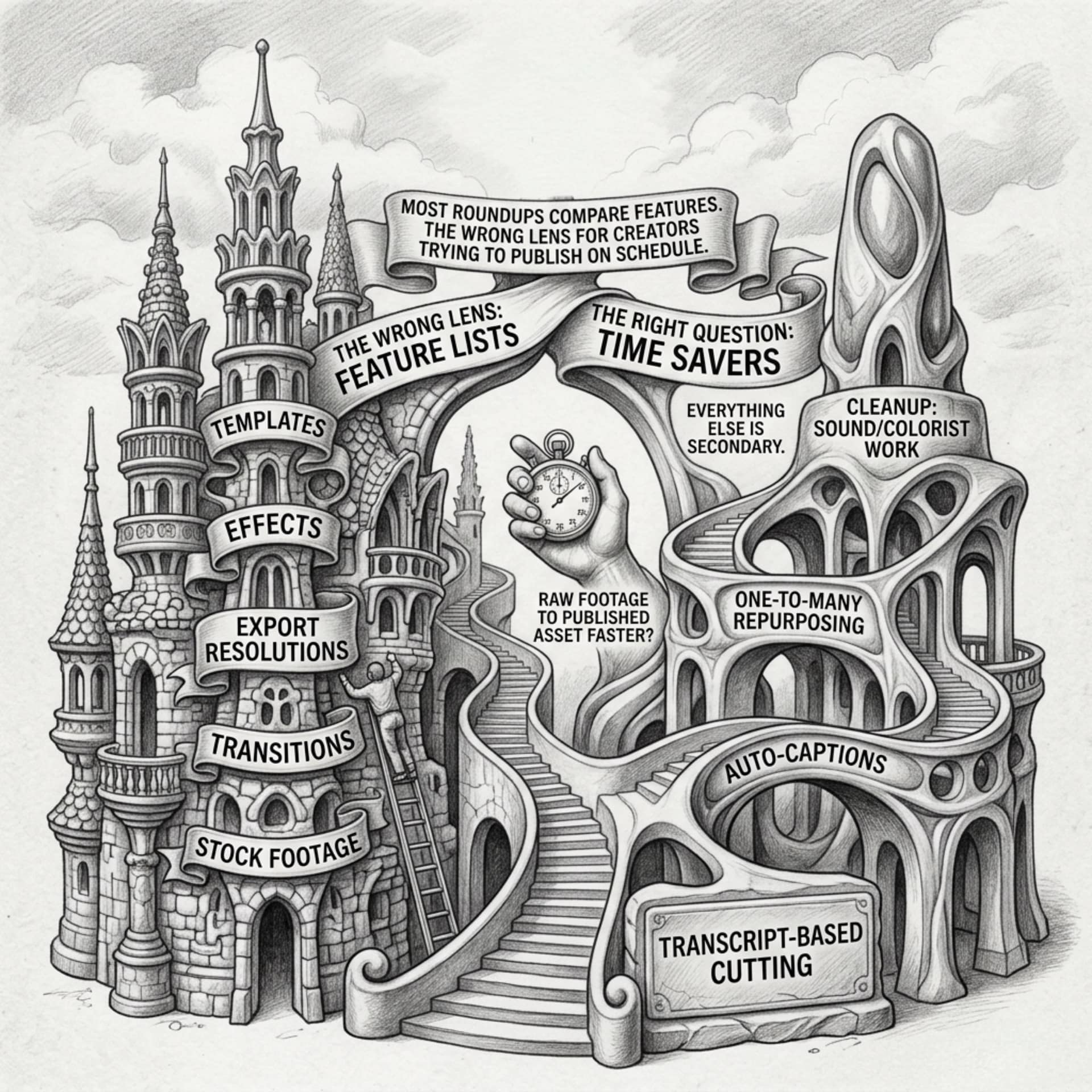
Most roundups of AI video editors compare feature lists: templates, effects, export resolutions. That is the wrong lens for a creator trying to publish on schedule. The right question is narrower: which parts of editing does the tool actually take off your plate, and how much faster does a video go from raw footage to published asset because of it? This piece ranks editors against four tasks that eat the most editing time: transcript based cutting, auto captions, one to many repurposing, and cleanup work that used to require a sound booth or a colorist. Everything else is secondary.
Why Editing Speed Now Decides How Often You Can Rank
Ranking consistency rewards the channels that show up on a rhythm. A single excellent video posted once a month competes against accounts posting three times a week, and the algorithm has more fresh signal to work with from the latter. That means the real constraint on most creators is not ideas or camera gear, it is the hours between filming and a finished, captioned, correctly formatted upload.
Traditional editing scales badly. Cutting on a timeline, scrubbing for the right moment, manually typing captions, resizing for five platforms separately: each of those is a fixed time cost per video, and that cost does not shrink no matter how good you get at the software. AI editors change the shape of that cost. Instead of scrubbing a timeline, you edit a document. Instead of writing captions by hand, you review a transcript the software already generated. Instead of resizing a video five times, you ask for five versions at once.
The editors worth paying for are the ones that remove a whole category of manual work, not the ones that make the old workflow slightly prettier. That is the filter for the rest of this article.
Text Based Editing? Cut A Video By Editing A Transcript
Transcript based editing is the single biggest time saver on this list, because it replaces scrubbing with reading. The software transcribes your footage, you delete the sentences you do not want, and the video cuts itself to match. Removing a rambling answer or a flubbed take takes seconds instead of the usual back and forth of finding the exact frame.
Descript popularized this approach and remains one of the clearest examples of it. CapCut and several newer entrants have added similar transcript editing panels, though the accuracy of the cut points and how well filler words get caught still varies between tools, so it is worth testing on your own footage before committing.
This matters most for talking head content, interviews, and tutorials, where a large share of editing time is just removing dead air and bad takes. It matters less for heavily visual or music driven edits, where the cut points are rhythmic rather than verbal. If most of your output is someone speaking to camera, transcript based editing alone can cut your editing time more than any other single feature on this list.
Auto Captions And Subtitles That Save Hours Per Video
Captions used to mean a separate pass: export the video, run it through a captioning tool, review every line for errors, style the text, re-export. AI editors now generate captions as part of the transcription step that happens anyway for transcript editing, so the caption file arrives nearly free.
The time savings compound because captions are not optional anymore for most platforms. A large share of viewers watch with sound off, and captions are also one of the few text signals a platform can read directly from your video content. Getting them generated automatically and styled in a brand template, rather than typed and formatted by hand, removes a task that used to take as long as the edit itself on short form content.
Check accuracy on names, brand terms, and numbers specifically, since those are where auto captioning tools make the most mistakes. A quick manual pass to fix proper nouns is still worth the few minutes it takes. For more on why captions and transcripts influence discoverability beyond accessibility, Video SEO Best Practices For 2026 covers the ranking side of that in more detail.
Turn One Long Video Into A Week Of Shorts
One to many repurposing is where AI editing has the clearest effect on upload cadence, because it turns a single filming session into a week of content rather than a single post. Tools like Opus Clip and similar repurposing engines scan a long form video, identify segments likely to work as standalone clips, and export them reframed for vertical platforms with captions already burned in.
The quality of the clip selection varies by tool and by the kind of content you feed it. Interview and podcast style long form video, with clear spoken segments and natural pause points, repurposes more cleanly than fast cut visual content where there is no obvious self contained moment to extract.
For a creator chasing upload cadence, this is the feature that changes the math most directly. One hour of filming and one long form edit can become five or six short form posts without five or six separate editing sessions. That is a direct lever on how often you can publish without adding hours to the week, which is exactly the constraint most roundups ignore when they rank editors by feature count instead of by task automation.
AI Noise Cleanup And Voice Enhancement Without A Sound Booth
Audio quality affects watch time more than most creators expect, and watch time affects ranking. A viewer will forgive mediocre lighting far more readily than they forgive audio they have to strain to hear. AI noise cleanup and voice enhancement tools, such as Adobe Podcast’s speech enhancement feature or the noise reduction built into several editors, remove room echo, hum, and background noise without needing an actual sound booth or a separate audio editing pass.
This matters for upload cadence because audio problems used to mean a reshoot or a frustrating manual repair in a separate audio tool. Automated cleanup turns a recording made in an imperfect space into something usable in one pass, which keeps filming flexible. You can record in a home office or a borrowed room and still publish audio that holds attention, which removes one more excuse to delay a video because the conditions were not ideal.
Results vary with how bad the source audio is to start with. Heavy echo in a large room is harder to fully repair than light background hum, so this tool extends what counts as usable footage, it does not replace decent recording conditions entirely. For practical guidance on getting better source audio and video in the first place, How To Film Professional-Looking Videos On A Budget is worth a look before you lean too hard on cleanup software to fix it after the fact.
Smart Scene Detection And Automatic B Roll Matching
Scene detection tools scan footage and automatically mark cut points at changes in shot, speaker, or scene, which removes the manual work of scrubbing through raw footage to find where one segment ends and another begins. Some editors pair this with automatic b roll suggestion, matching stock footage or your own library clips to keywords detected in the transcript.
This is less mature than transcript editing or captioning, and the matching is not always precise. A b roll suggestion tied to a keyword can miss the actual intent of a sentence, so this feature works best as a starting point you refine rather than a finished edit you publish untouched. Treat the suggestions as a first draft layer: they narrow down what to look for, and you make the final call on whether a clip actually fits.
Where this earns its place in a fast workflow is in bulk content, where you are producing several similar videos and the same kind of b roll keeps recurring. Once a library is built and tagged, automatic matching gets faster and more accurate over time, which makes it more useful for channels with an established format than for a one off video with unusual visual needs.
Choose An Editor That Fits Your Upload Schedule, Not Just Your Budget
Price is the first filter most creators apply, but it is the wrong starting question. The better question is: what does a week of your content actually require, and which tool removes the most manual hours from that specific week?
A few ways to frame the decision:
- If most of your output is spoken content (interviews, tutorials, talking head videos), prioritize transcript based editing and auto captions over everything else on this list. That is where the bulk of your editing time currently goes.
- If your cadence depends on turning long form into short form, weight repurposing tools heavily, even if it means paying for a second tool alongside your main editor rather than one that tries to do everything adequately.
- If you record in inconsistent conditions, such as different rooms or borrowed equipment, noise cleanup and voice enhancement will save you more time than any visual feature, because it stops bad audio from forcing a reshoot.
- If you are producing a high volume of similar content, scene detection and b roll matching start to pay off once you have a tagged library to match against. For a single standalone video, they add less value than the other three categories.
No single editor currently does all four tasks equally well, so most fast publishing workflows combine two tools rather than relying on one. The combination that fits depends on which editing task is currently costing you the most hours, not which tool has the longest feature list.
For the ranking and analytics side of this workflow, once the editing bottleneck is solved, see Top Video Ranking Software Solutions For Small Businesses In 2026.
Rank on social media on Amazon
Keep Exploring V-Rank
Creating a great video is only part of the journey. Getting it discovered, watched, and ranked is the next challenge.
V-Rank brings together practical guides, tools, and resources for improving video visibility—from video creation and SEO to platform algorithms, audience engagement, and ranking strategies.
New to video ranking?
Start with the Starter guides and build the fundamentals step by step.
Already know the basics?
Explore Advanced strategies for improving visibility, engagement, and performance.
Looking for deeper insights?
Visit the Expert section for more detailed ranking strategies and analysis.
Or browse the Latest Blogs to see what’s new on V-Rank.
Keep Learning. Keep Testing. Keep Ranking.
Video platforms change. Algorithms evolve. Tools come and go.
The goal of V-Rank is to help you understand what matters, test what works, and make better decisions about getting your videos discovered.
Wishing you the best of luck in achieving the top position!
First steps as a vlogger?
Visit Vlogsuite with tips and tools for vloggers
May you soar to rank #1 and celebrate your success with joy and excitement! 🚀 🏆🎉
Good luck ✨
Learn how to monetize your own website and sign up for free
This is an affiliate link to a tested platform that’s great for beginners who want to learn web development.
And make your own images