Table of Contents
Youtube Video Ranking Factors
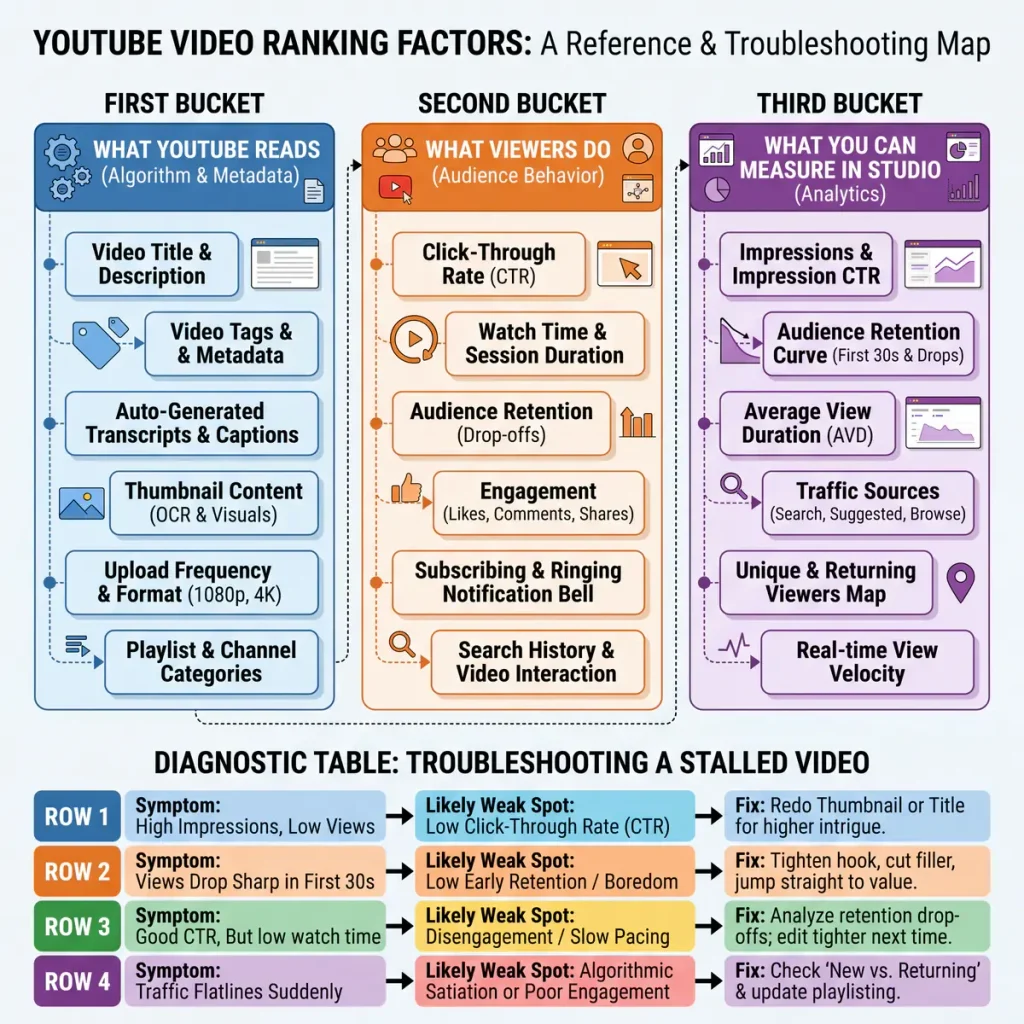
YouTube ranks a video by matching it to what a viewer wants, then watching how viewers respond to it. The youtube video ranking factors fall into three buckets: what YouTube reads, what viewers do, and what you can measure in Studio.
Think of each upload as a job applicant. YouTube reads the résumé (title, description, transcript), watches the interview (do people click, stay and react), and you get the feedback report in Studio. A weak résumé gets no interview, and a great résumé with a bad interview gets one callback. Knowing which stage failed saves a lot of random tweaking.
What are the YouTube video ranking factors that matter most?
Sort every factor into one of three buckets and the list stops feeling endless.
Bucket one is what YouTube reads. These are the words and files you control directly.
- Title, including the main phrase a viewer would type
- Description, especially the first two lines
- Spoken words, which YouTube turns into automatic captions, plus any captions you upload
- Chapters and their labels
- Thumbnail, which YouTube does not read as text but every viewer judges in a glance
- Language and category settings
- Tags, which carry very little weight (more on that below)
Bucket two is what viewers do. You influence these but never control them.
- Click-through rate, meaning how often viewers click after seeing the thumbnail and title
- Watch time and average view duration
- Audience retention, meaning where in the video people leave
- Satisfaction signals such as likes, shares, comments and survey responses
- Whether viewers keep watching YouTube after your video
- Whether the same people come back for the next one
Bucket three is what you can measure in Studio. This bucket is the reporting layer. It does not rank anything on its own, but it shows how the first two buckets are doing.
Factor | Bucket | Where to check it |
|---|---|---|
Title and description match | YouTube reads | Analytics, Reach, YouTube search terms |
Thumbnail and title appeal | Viewers do | Impressions click-through rate |
Watching to the end | Viewers do | Average percentage viewed, retention graph |
Total time spent | Viewers do | Watch time, average view duration |
Audience loyalty | Viewers do | Returning viewers, Audience tab |
Where views come from | Measure | Traffic sources |
YouTube states that its search results rely on relevance, engagement and quality. Those three words map neatly onto the buckets. Relevance is what YouTube reads, engagement is what viewers do, and quality is the sum of how both look over time.
Which viewer signals does YouTube measure, and how do you read them?
Read the signals in the order a viewer meets them. First the video is shown (impressions), then clicked (impressions click-through rate), then watched (average view duration and retention), then reacted to (likes, comments, shares, returning viewers). A problem at one stage hides the stages after it, so always start at the earliest weak point.
Two formulas help you check the dashboard yourself.
- Click-through rate equals clicks divided by impressions.
- Average view duration equals total watch time divided by views.
Here is an illustration with made-up numbers, meant only to show the arithmetic. A video shown 4,000 times that earns 200 views has a 5 percent click-through rate. If those 200 views add up to 600 minutes of watch time, the average view duration is 3 minutes. Whether 5 percent or 3 minutes is good depends entirely on your channel, your topic and the video’s length, so compare against your own recent videos and ignore universal “good” numbers you see quoted online.
How to read the retention graph
The audience retention graph in Studio shows the percentage of viewers still watching at each moment. Four shapes come up again and again.
- A steep drop in the first 30 seconds. The intro did not deliver what the title promised, or it took too long to start.
- A steady slope downward. This is normal. Look at how steep it is compared with your other videos of similar length.
- A sudden cliff mid-video. Something at that exact timestamp lost people. Watch it. It is often a long tangent, a sponsor read or a slow transition.
- A bump or rise. Viewers skipped back or rewatched. That section is doing something right, so do more of it.
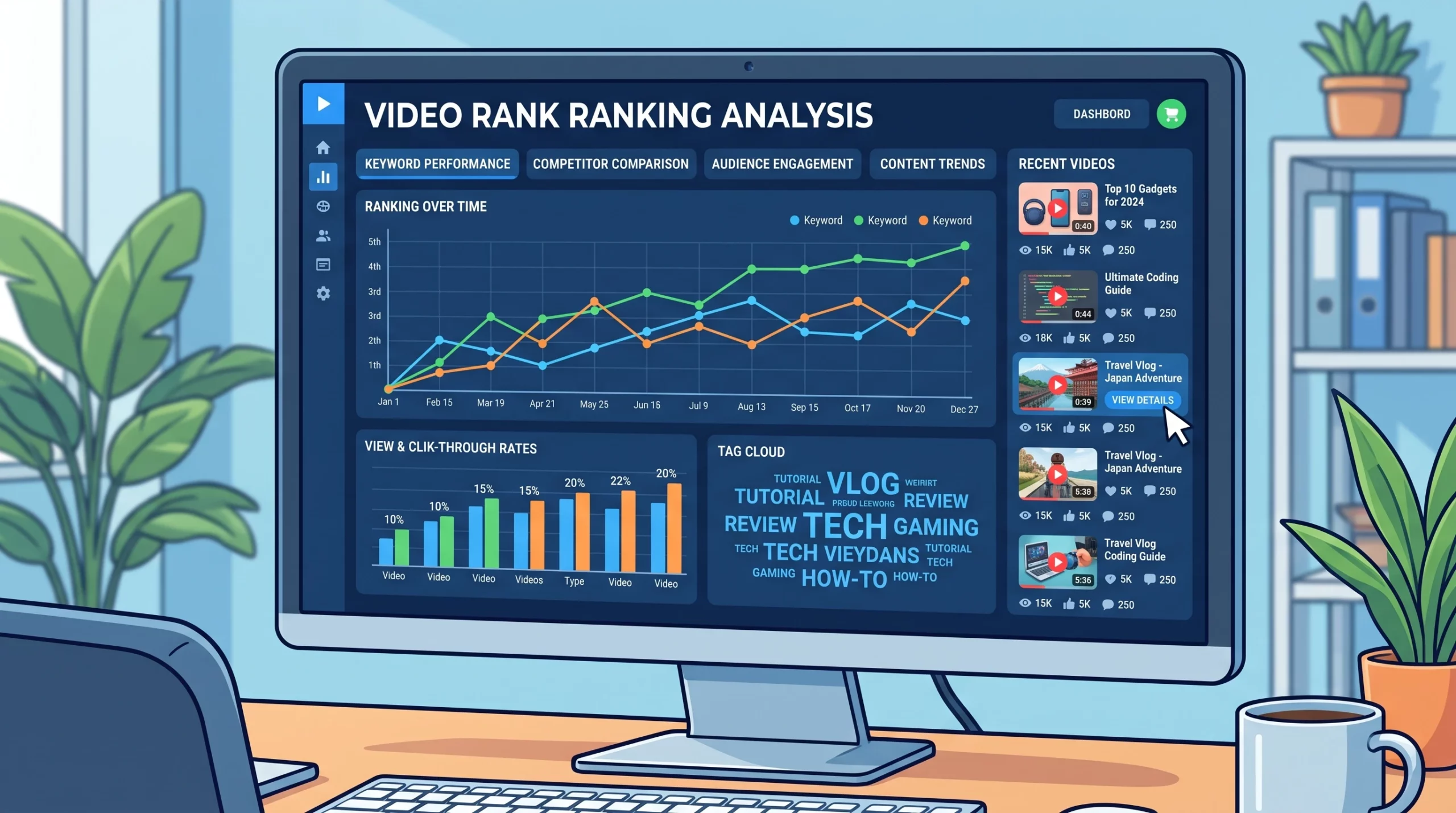
Check the traffic sources report too. Search traffic suggests the résumé matched a query. Browse and suggested traffic suggest the interview went well enough for YouTube to offer the video to people who did not search for it. A video can do well in one and poorly in the other, which tells you where to focus.
How do you optimize a video for search?
Choose the phrase before you film. Type the topic into the YouTube search box and note the autocomplete suggestions, because those are queries real viewers type. Pick one main phrase and two or three close variants, then build around them.
Work through this list for every upload.
- Build the title around the main phrase. Put it near the front, keep it readable, and promise something specific.
- Say the phrase out loud early. Speak it within the first lines of the video. The automatic transcript then confirms what the title claims.
- Write the first two lines of the description for a human. They appear before the “show more” fold and should contain the main phrase and a plain summary of what the video covers.
- Add chapters. Each label can use a variant of the phrase, and chapters help viewers jump to what they came for, which protects retention.
- Upload or correct captions. Automatic captions mishear names and jargon, and a clean transcript gives YouTube cleaner text to read.
- Match the thumbnail to the title. The thumbnail should show one clear idea that the title completes. A mismatch gets clicks that turn into quick exits.
- Link to a related video or playlist. This gives a satisfied viewer somewhere to go next on your channel.
For a longer checklist covering the technical side, the video SEO best practices guide goes further than this section does.
Do tags help video ranking, and does video length matter?
Tags help very little. YouTube’s own help documentation says tags play a minimal role in discovery and mainly help when viewers misspell a term in a search. Put the main phrase and a common misspelling in the tag field if you like, then move on. Time spent on a fifty-tag list is time taken from the title and the intro.
Video length has no ideal number. YouTube does not reward a video for being long or short. It rewards viewers who stay and leave satisfied, so length matters only through its effect on retention and watch time.
That effect cuts both ways.
- A longer video can collect more total watch time, but only if viewers stay. If they leave at the 40 percent mark, the extra length has done nothing.
- A shorter video can post a high average percentage viewed, but a 90 percent finish on a very short video may still produce little total watch time.
The practical test is to line up your last ten or so videos in Studio and compare average percentage viewed against length. If your longer videos hold viewers about as well as the short ones, length is not your constraint. If retention falls off with each added minute, cut the sections that do not serve the title’s promise.
Why is my video not ranking? A diagnosis table
When a video stalls, match what you see in Studio to the row below. Each row names the likely weak spot and the first thing to check. These are probabilities, not guarantees, and the “low” and “high” in each row mean relative to your own channel’s recent videos.
What you see in Studio | Likely weak spot | First thing to check |
|---|---|---|
Very few impressions | The video is not matching searches, or the topic has little demand | YouTube search terms report, then compare your title with autocomplete suggestions |
Impressions are fine, click-through rate is low | Title or thumbnail | Rewrite the title to be more specific, and check whether the thumbnail shows one clear idea |
Click-through rate is fine, big drop in the first 30 seconds | Intro does not match the promise | Watch the first half minute as a stranger would, and cut anything before the payoff |
Retention dips at one timestamp | One weak section | Watch that moment, then trim or reorder it in your next video |
Average percentage viewed is low across the whole video | Length or pacing | Compare it with your shorter videos on the same topic |
Plenty of views, few likes, comments or shares | Audience mismatch, or no reason to react | Check whether the title attracted the wrong viewers, and ask one specific question near the end |
Strong first days, then views flatten | Search demand is small, and early views came from your existing audience | Traffic sources report, comparing search with subscribers and browse |
Ranks for odd phrases you did not target | Metadata and spoken words point to a different topic | Search terms report, then align title, description and transcript |
Views only from external sources | Not enough interest signals inside YouTube | Compare retention of external viewers with YouTube viewers in the traffic sources report |
Good numbers but no growth in subscribers or returning viewers | The video is a one-off with no obvious next step | Add an end screen and a pinned comment pointing to a related video |
Change one thing at a time and write down the date. If the title and thumbnail change on the same day as a new description, you will never know which change moved the number.
How do you rank YouTube videos fast?
Nobody can promise speed, and any tool that does is guessing. What a creator can do is shorten the time between publishing and learning, so the next fix arrives sooner.
- Pick a phrase with fewer competing videos. A narrower query gives a new video a better chance to show up near the top. Search the phrase and check how many established channels already cover it.
- Publish when your audience is on YouTube. Studio’s Audience tab shows when your viewers are usually online. An early burst of clicks and watch time gives YouTube more to measure.
- Send the video to people who care. A newsletter, a community post or a relevant forum thread can bring in viewers who actually want the topic. Viewers who click and leave in ten seconds do more harm than good, so aim at people who will watch.
- Review after 48 hours. Early data shows the click-through rate and the first retention curve. If the click-through rate looks weak against your recent videos, a new title or thumbnail is the quickest repair.
- Update an older video instead of making a new one. A video that already has impressions and a few views often responds well to a better title, thumbnail and description.
For more tactics aimed at organic views, the article on best video ranking strategies for increasing organic YouTube views covers the wider picture.
How do you rank a video in Google too?
Google can show a YouTube video directly in its search results, and for many queries it does. A video that ranks well on YouTube for a phrase has a head start, because Google also reads the title, description and page text around it. A clear, specific title that mirrors how people search helps in both places.
If you embed the video on your own website, the page needs more than the embed.
- Give the page a descriptive title and a heading that uses the target phrase.
- Write a short text summary or transcript on the page, so Google has words to read.
- Add video structured data (the VideoObject type) so Google understands the title, thumbnail and upload date.
- Include the video in a video sitemap, and use Google Search Console’s video indexing report to check whether Google found it.
- Make sure the video is the main content of the page and that the page loads quickly.
Note that Google usually shows one video result per page, so a page with several embedded videos may only surface one of them. The guide on Google video rankings explains what Google looks for in more detail.
Which useful AI tools and references help you track ranking factors?
Start with the free ones, because they cover all three buckets. YouTube Studio analytics shows the viewer signals. Google Search Console covers the Google side of embedded videos. Google Trends shows whether interest in a topic is rising or falling. YouTube’s search box autocomplete shows what people type.
Browser extensions such as vidIQ and TubeBuddy add keyword and competitor views on top of Studio. They are worth a trial if you publish often, though the numbers they show are estimates, so treat them as hints and let Studio’s own data settle arguments.
Useful AI tools can save time on the slower tasks.
- Draft ten title variants for one video, then pick the two that sound most like a human wrote them.
- Summarize a pile of comments to spot repeated questions that point to your next topic.
- Turn a transcript into a first draft of chapter labels.
- Compare your title and description against the phrase you meant to target and flag gaps.
Always check the output against the video itself. An AI tool can write a chapter title for a section that does not exist, and a confident wrong answer is still wrong. The tool speeds up the drafting, and Studio’s numbers still decide what worked.
Run one video through the table
Pick your weakest video, run it through the diagnosis table, and note one metric to compare after two weeks. Pick the metric from the row that matched, whether that is click-through rate, average percentage viewed or search impressions. Then read the Top Tools For Video Ranking Analysis guide to choose how to track it, and come back to see whether the number moved.
If it did not, that is useful too. The video simply handed you a better question for the next upload.
Keep Exploring V-Rank
Creating a great video is only part of the journey. Getting it discovered, watched, and ranked is the next challenge.
V-Rank brings together practical guides, tools, and resources for improving video visibility—from video creation and SEO to platform algorithms, audience engagement, and ranking strategies.
New to video ranking?
Start with the Starter guides and build the fundamentals step by step.
Already know the basics?
Explore Advanced strategies for improving visibility, engagement, and performance.
Looking for deeper insights?
Visit the Expert section for more detailed ranking strategies and analysis.
Or browse the Latest Blogs to see what’s new on V-Rank.
Keep Learning. Keep Testing. Keep Ranking.
Video platforms change. Algorithms evolve. Tools come and go.
The goal of V-Rank is to help you understand what matters, test what works, and make better decisions about getting your videos discovered.
Wishing you the best of luck in achieving the top position!
First steps as a vlogger?
Visit Vlogsuite with tips and tools for vloggers
May you soar to rank #1 and celebrate your success with joy and excitement! 🚀 🏆🎉
Good luck ✨
Learn how to monetize your own website and sign up for free
This is an affiliate link to a tested platform that’s great for beginners who want to learn web development.
And make your own images