Table of Contents
The 2027 Video SEO Audit Checklist
23 Quick Fixes For Videos You’ve Already Published
Most of the advice aimed at vloggers assumes the problem is ahead of you: the next title, the next thumbnail, the next upload that will finally break through. But if you’ve got a back catalogue of videos sitting on your channel, the fastest ranking gains usually aren’t in what you haven’t made yet. They’re sitting in what you’ve already published, quietly leaking views because of a tag that was never filled in, a caption file that was never checked, or a thumbnail nobody has touched since upload day.
Why Your Next Upload Isn’t The Fix, Your Last 10 Videos Are
A new video has to earn trust from scratch. An old video already has watch time, some search impressions, maybe a few comments, and a position in Google’s index it’s not going to lose overnight. That existing footprint is worth more to you right now than a blank upload, because small fixes to it show up in rankings within days rather than months.
This is the logic behind a video SEO audit: instead of guessing what might work on your next upload, you go back through what you’ve already shipped and find the specific things costing you visibility. A missing keyword in a title. A description that trails off after one line. A caption file auto-generated and never corrected. Each one is small on its own. Across ten or twenty videos, they add up to a real gap between where you rank and where you could.
The checklist below is built to be run against videos that are already live, not videos you’re planning. Work through your most recent uploads first, since fresh content responds fastest to metadata changes, then move backward through your catalogue as time allows.
Metadata Audit? Titles, Tags And Descriptions
Open your last ten videos and read the titles with no context, as if you were a stranger scrolling search results. Does the title tell that stranger what the video actually contains, or does it only make sense if they already know your channel? A title like “Episode 14” ranks for nothing. A title with your core keyword placed early, followed by a specific detail, gives both Google and the viewer something to grab onto.
Check tags next. Many creators fill tags once, early on, then forget they exist. Look for:
- Tags that are just your brand name repeated in different orders
- Tags describing a product, tool, or trend that’s since been discontinued or renamed
- A total absence of your actual target keyword anywhere in the tag list
Then open the description box. If it’s three lines followed by a wall of unrelated hashtags, that’s a leak. The first two sentences of a description carry real search weight and show up in search snippets, so they need to say something specific about the video, not just restate the title.
This is one of the areas where a few minutes of editing per video can move the needle fast, because you’re not waiting on new watch data to accumulate, you’re correcting information Google already has a slot for. For the full breakdown of how each metadata field feeds into ranking signals, see how to use metadata to improve video rankings.
File Names, Captions And Transcripts Google Can Actually Read
Before a video is even uploaded, the file name is doing quiet work. “IMG_4821.mp4” tells a search engine nothing. A file renamed to include your keyword, before upload, gives the platform one more signal to match against a search query. If you’ve already uploaded under a generic file name, you can’t always go back and change it after the fact, but it’s worth knowing for every video from here forward.
Captions are where the real audit time should go. Auto-generated captions get product names wrong, drop technical terms, and mangle anything said quickly or with an accent the system doesn’t recognise well. Google can and does read captions as text content tied to the video, which means a caption file full of errors is feeding incorrect information into the exact system you’re trying to rank with.
Pull up three of your videos and watch thirty seconds with captions on, checking against what’s actually said. If you see repeated errors on your niche’s core terms, that’s worth fixing across the whole catalogue, not just the one video, since the same terms are probably mangled everywhere.
Transcripts matter for the same reason, and for viewers who scan before committing to watch. A transcript or detailed description with your main keyword phrases, written in full sentences rather than keyword lists, gives search engines more context to match your video against long-tail queries you’re not currently ranking for at all.
Thumbnails And Click Through Rate? The Silent Ranking Killer
A video can have perfect metadata and still underperform because nobody clicks it. Click through rate is one of the clearest signals a platform uses to decide whether to keep showing your video in search and suggested results, and a weak thumbnail suppresses that rate before anyone even gets to judge the content.
Pull up your channel’s video grid and squint at it from across the room, or shrink the browser window. Can you tell your videos apart from a distance? If every thumbnail is a similar close-up frame with no text, no consistent colour, and no visual hook, they blur together and none of them stand out in a crowded search page.
Run this check on your last ten videos:
- Is there a readable focal point, even at small size on a phone screen
- Does the thumbnail promise something specific, rather than a generic “watch to find out”
- Is there visual consistency with your other videos, so returning viewers recognise your channel at a glance
- Does the thumbnail match what the video actually delivers, since a mismatch spikes clicks but tanks retention right after
If you’re testing thumbnail options as part of this audit, it’s worth checking how the equipment and editing habits behind your footage affect how your thumbnails look, especially lighting and framing choices made at filming time rather than after the fact. How to film professional-looking videos on a budget covers the setup side of that if your thumbnails are suffering from the source footage rather than the crop.
Retention And Engagement Signals Worth Rechecking
Metadata and thumbnails get someone to click. What happens after the click is a separate signal, and it’s one creators check once at launch and then never again. Open your analytics for the videos you’ve just audited and look specifically at the audience retention graph, not just the overall average view duration.
A steep drop in the first fifteen seconds usually means the opening doesn’t deliver on what the title or thumbnail promised, or it takes too long to get to the point. A second drop partway through often marks a specific section, a slow transition, an ad read, a tangent, that’s losing people. These drops are fixable even after publishing, through end screens, pinned comments pointing to the good part, or by trimming the next upload using the same structure.
Engagement signals worth rechecking alongside retention:
- Comment rate relative to view count, and whether you’ve replied to recent comments, since engagement on a video can extend its active ranking window
- Like to view ratio compared across your last ten videos, which flags outliers worth understanding
- Whether cards or end screens are pointing to your best-performing related video, or to something outdated
This pairs well with a deeper look at the video analytics checklist to refine and improve ranking strategy, which walks through which metrics are worth tracking over time versus which are noise.
Playlists And Channel Structure? The Layer Most Creators Skip
Individual video fixes only go so far if the channel around them is disorganised. Playlists are one of the most underused ranking tools available to vloggers, because a well-built playlist keeps a viewer watching multiple videos in a row, and that session watch time tells the platform your channel as a whole is worth promoting, not just one isolated video.
Check whether your playlists actually group videos by topic and keyword, or whether they’re just chronological dumps labelled “2026 Videos” or “Vlogs.” A playlist titled with a real keyword phrase, holding videos that genuinely belong together, can rank in search on its own, separate from any individual video inside it.
Look at your channel’s About section and featured sections too. If a new visitor lands on your channel page, does it immediately show them your best entry points, or does it show whatever uploaded most recently regardless of quality or topic fit? Channel structure is the layer most audits skip entirely because it doesn’t feel like “SEO” the way a title tag does, but it’s part of how a platform decides whether your channel deserves more reach.
If you’re also publishing product-focused video content as part of a vlogging business, the structural logic is similar but the keyword targets shift toward buyer intent. Video SEO for e-commerce product pages covers that angle specifically if any of your playlists are product-driven rather than purely editorial.
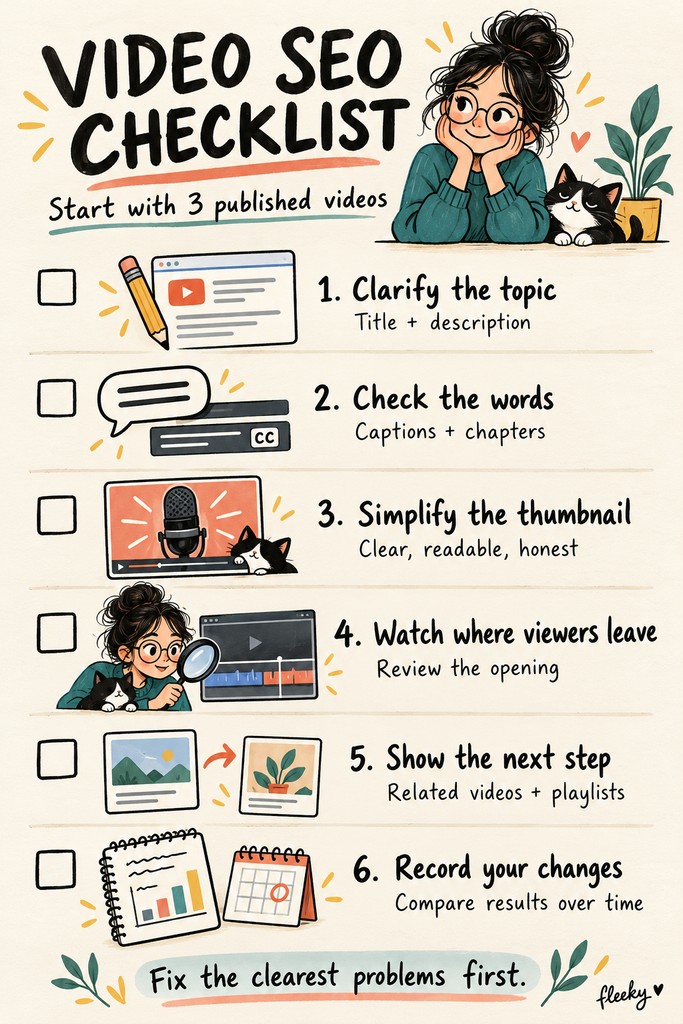
Check the free checklist below and run it against your three most recent uploads before you film anything new.
Study The Checklist And Run Your First Audit This Week
Running this audit properly means working through each section above against real videos, not reading it once and nodding along. The gap between a channel that’s slowly losing ground and one that’s climbing is usually not a secret algorithm trick, it’s whether someone actually went back and fixed the small, findable things.
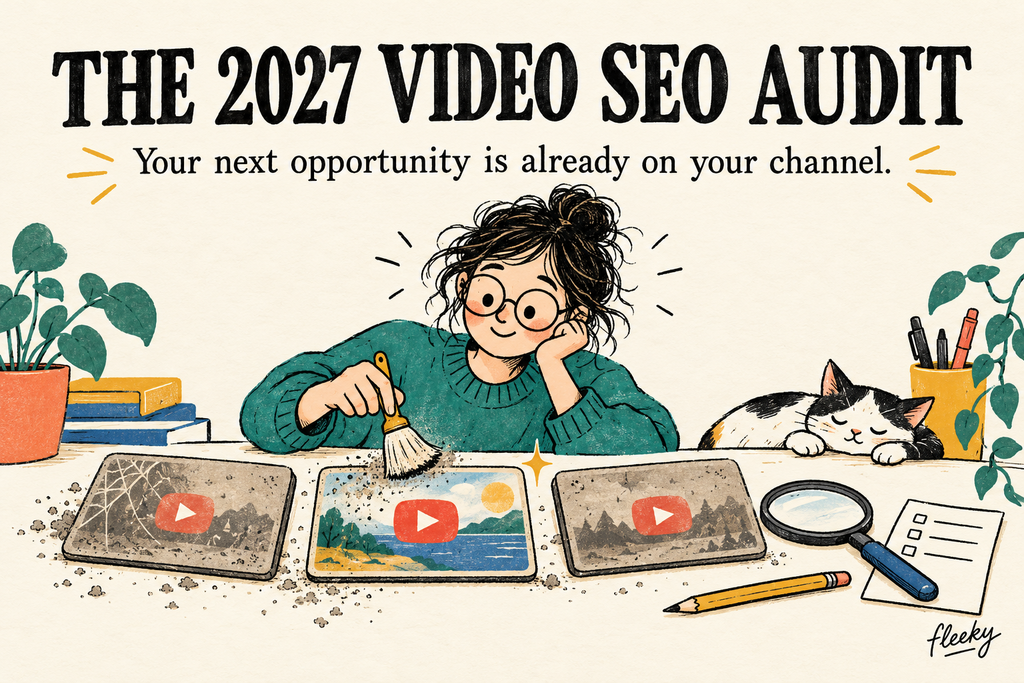
The 2027 Video SEO Audit Checklist
23 practical checks for videos you’ve already published
Your next opportunity might already be on your channel. Give it a little housekeeping.
Start with three useful videos that still attract impressions, especially those with unclear titles, weak thumbnails or outdated information. You can expand to ten later.
This checklist focuses on YouTube. The 2027 title names the edition; the advice reflects guidance available in October 2026. Changes can improve clarity and viewer experience, but they do not guarantee higher rankings.
Make the topic clear
- 1. Give each video one clear purpose.
Finish this sentence: “This video helps someone…”
Example: “…choose a microphone for indoor interviews.” - 2. Replace vague titles with specific ones.
A stranger should understand the subject without knowing your channel.
Example: “Episode 14” → “How to Record Clear Interview Audio at Home.” - 3. Use the main search phrase naturally.
Include the words your intended viewer would use, without repeating them awkwardly.
Example: “Balcony Herb Garden: What to Plant in Small Pots.” - 4. Make the opening description useful.
Explain what viewers will learn before adding your channel introduction or links.
Example: “Learn how to position a budget microphone and reduce room echo during indoor interviews.” - 5. Remove outdated information and broken links.
Check product names, prices, downloads and recommendations.
Example: “The original model is discontinued. The linked replacement has not been tested in this video.” - 6. Give tags a quick tidy, then move on.
Remove irrelevant tags. Add useful spelling variations where appropriate. Tags otherwise play a minimal role in discovery.
Example: Include a commonly misspelled product name—not twenty versions of “best camera.” YouTube Help
Make the video easier to follow
- 7. Check the video language setting.
Select the language actually spoken.
Example: An English tutorial should have English selected as its original language. - 8. Check that captions are available.
Watch a short section with sound off. Can you follow it?
Example: Viewers should understand the microphone setup without hearing your narration. - 9. Correct caption mistakes.
Review names, technical terms, numbers and instructions—not just the first thirty seconds.
Example: Correct “road wireless go” to “RØDE Wireless GO” where that is what you said. - 10. Check caption timing.
The words should appear alongside the relevant speech.
Example: “Connect the cable here” should appear while you show the connection.
YouTube recommends reviewing automatic captions because accents, pronunciation and background noise can cause errors. Caption text and timing can be edited in Studio. YouTube Help
- 11. Add a readable transcript where it helps.
If the video has a companion website article, include a corrected transcript or useful written summary.
Example: Put the equipment list and setup instructions beneath the embedded tutorial. - 12. Check the chapter labels.
Add or correct chapters for longer videos with distinct sections.
Example: “Choosing a microphone,” “Positioning it,” and “Reducing echo.” YouTube Help
Give viewers a clear reason to click
- 13. Look at the thumbnail on your phone.
Check it at normal browsing size. Can you recognise the subject immediately?
Example: One clear microphone beats a desk covered in tiny accessories. - 14. Remove visual clutter.
Use a clear focal point and readable text, if text is needed.
Example: “LESS ECHO” is easier to scan than a full sentence in miniature. - 15. Make the title and thumbnail work together.
Let each add something useful.
Example: Title: “How to Reduce Room Echo.” Thumbnail: a clear room comparison labelled “BEFORE / AFTER.” - 16. Check that the promise matches the video.
Remove claims the content cannot support.
Example: Change “Studio Sound for €10” if the demonstration also relies on expensive equipment. - 17. Read click-through rate in context.
CTR means how often a counted thumbnail impression becomes a view. Compare similar traffic sources and allow enough impressions before judging.
Example: A lower CTR after wider homepage exposure does not automatically mean the thumbnail got worse.YouTube Help
Help viewers stay—and find what comes next
- 18. Watch the opening alongside the retention graph.
Look for a mismatch between the promise and what appears first.
Example: The title promises a demonstration, but the video opens with a minute of announcements. - 19. Investigate a noticeable drop.
Watch that section before deciding what caused it. Record a practical response.
Example: Add a chapter so viewers can find the demonstration more easily. This helps navigation; it does not repair a slow introduction. - 20. Answer useful unanswered questions.
Reply where you can clarify something or correct a misunderstanding.
Example: “Yes, this works with a phone, but you need the adapter shown at 02:10.” - 21. Check cards and end screens where available.
Point viewers toward a relevant, current next video.
Example: Follow “Choose Your Microphone” with “Position Your Microphone,” rather than an unrelated recent upload. YouTube Help
Organise and review
- 22. Check playlists and your channel entrance.
Group related videos and make useful starting points easy to find.
Example: “Beginner Audio Setup” is clearer than “Miscellaneous Uploads.” Feature it alongside a short channel description explaining whom you help. - 23. Record changes and review the results.
Note what you changed and when. Set an initial review date, then allow longer if traffic is low.
Example: “12 March: clearer title. Review search impressions, CTR and watch time after four weeks.” Avoid attributing every movement to your edit.
Your first small audit
Choose three videos. Fix their clearest problems. Keep a simple record.
| Video | Main problem | Change made | Review date |
| Balcony herbs | Vague title | Named the topic and setting | ______ |
| Microphone setup | Incorrect captions | Corrected product names | ______ |
| Room echo | Confusing thumbnail | Simplified image and text | ______ |
Skip the busywork: Do not re-upload a published video simply to change its filename. Do not stuff descriptions with keywords or expect comment replies to trigger a ranking boost. YouTube describes search in terms of relevance, engagement and quality—not a checklist score. YouTube Help
Give the useful videos a clearer doorway. Then see who comes in.
SEO for vloggers on Amazon
Seo for advanced users on Amazon
Keep Exploring V-Rank
Creating a great video is only part of the journey. Getting it discovered, watched, and ranked is the next challenge.
V-Rank brings together practical guides, tools, and resources for improving video visibility—from video creation and SEO to platform algorithms, audience engagement, and ranking strategies.
New to video ranking?
Start with the Starter guides and build the fundamentals step by step.
Already know the basics?
Explore Advanced strategies for improving visibility, engagement, and performance.
Looking for deeper insights?
Visit the Expert section for more detailed ranking strategies and analysis.
Or browse the Latest Blogs to see what’s new on V-Rank.
Keep Learning. Keep Testing. Keep Ranking.
Video platforms change. Algorithms evolve. Tools come and go.
The goal of V-Rank is to help you understand what matters, test what works, and make better decisions about getting your videos discovered.
Wishing you the best of luck in achieving the top position!
First steps as a vlogger?
Visit Vlogsuite with tips and tools for vloggers
May you soar to rank #1 and celebrate your success with joy and excitement! 🚀 🏆🎉
Good luck ✨
Learn how to monetize your own website and sign up for free
This is an affiliate link to a tested platform that’s great for beginners who want to learn web development.
And make your own images